
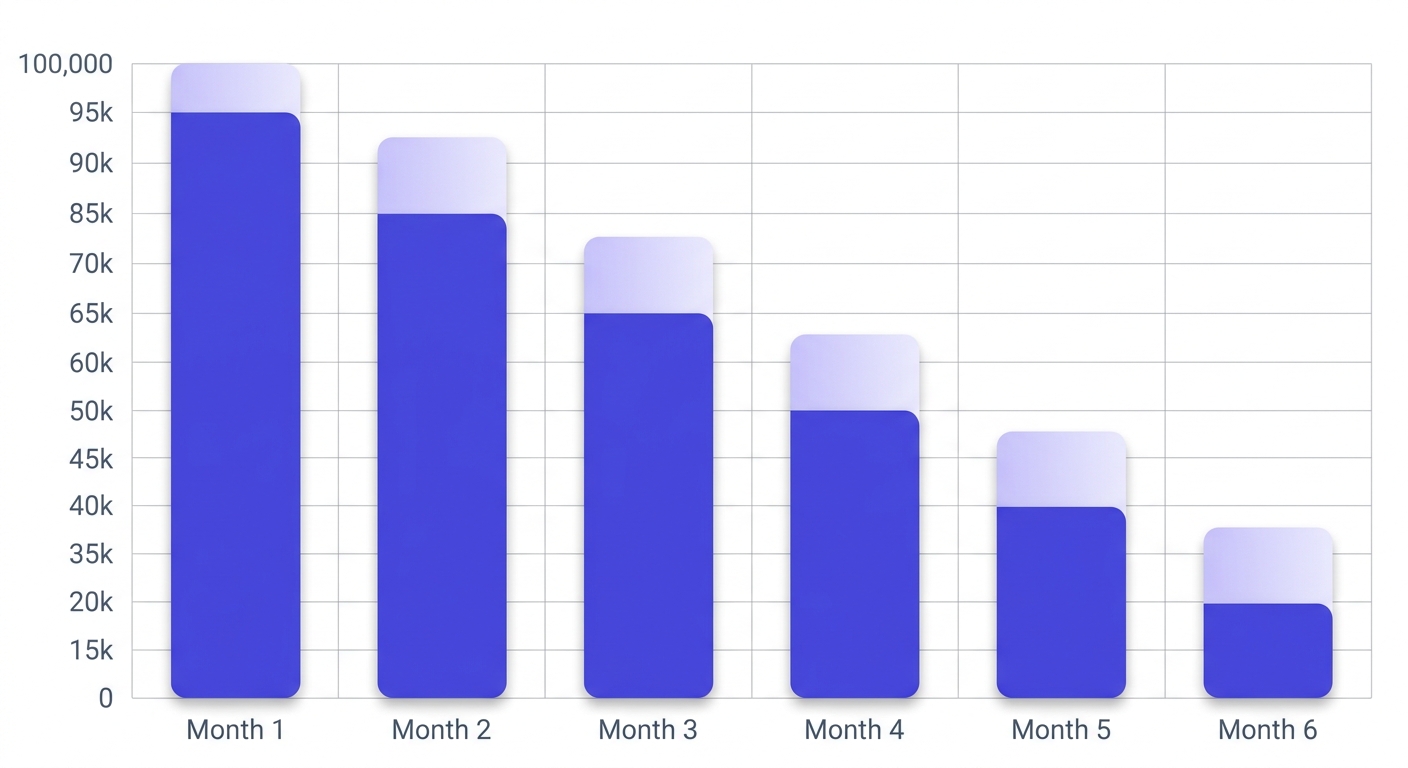
The average email list decays at 2–3% every month. That means a 100,000-address list you verified in January has already shed 6,000–9,000 valid addresses by April — before you've sent a single campaign.
After reading this, you'll know exactly how to run a bulk verification, read the status mix, segment your export, and connect the results to your ESP — without paying for answers your verifier couldn't actually give you.
The trick is one status that most verifiers hide in a drawer: unknown. How a tool handles it tells you everything about whether it's worth the money at scale.
What a bulk email verifier actually does
A bulk email verifier checks every address in a list before you send — not after a bounce report comes back to haunt you. The distinction matters. A bounce is a delivery failure that already happened. Verification is what prevents it.
Single-address tools like a single email checker are useful for spot-checks — paste one address, get a result in seconds. Bulk tools operate differently. You upload a CSV (or pipe addresses through an API), and the engine processes thousands or millions of rows asynchronously, returning a status for each one.
Here's the chain every address walks through:
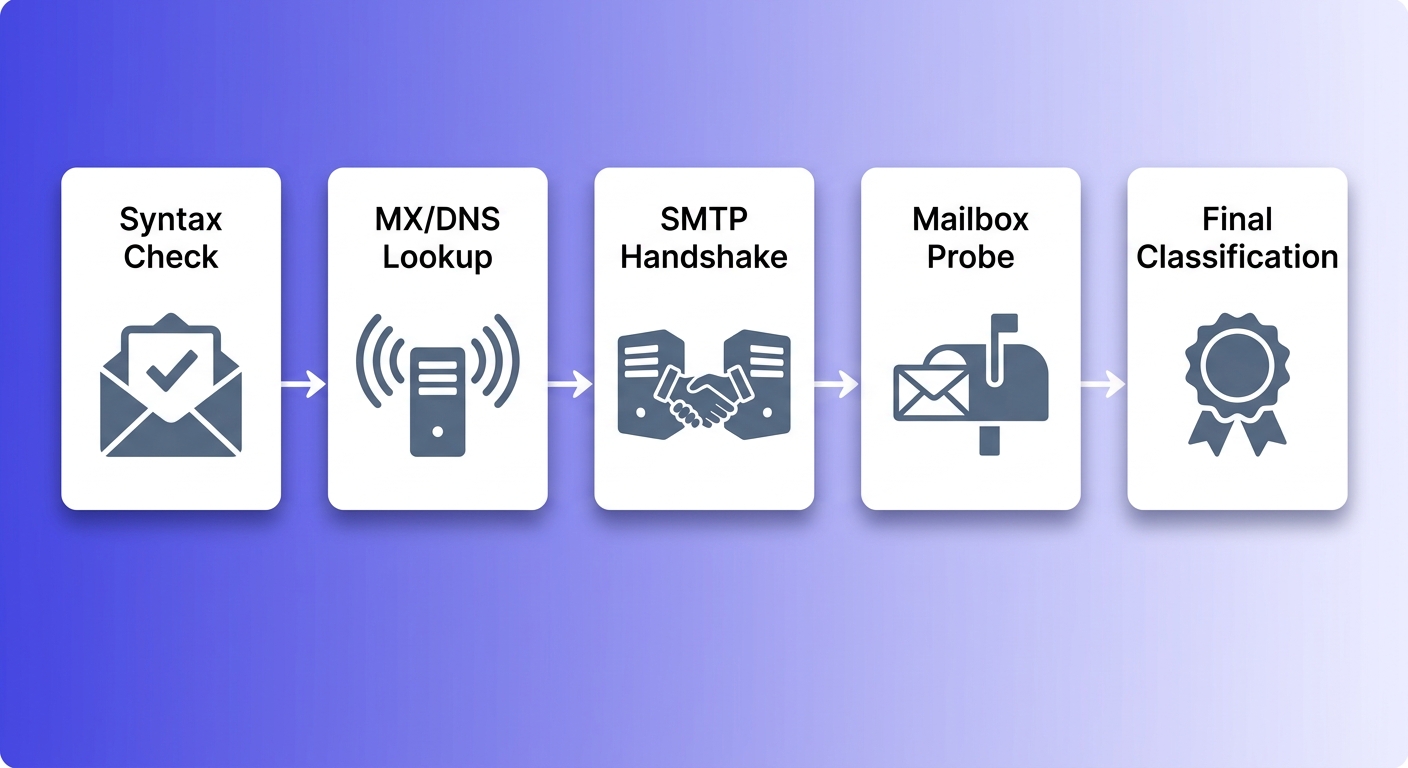
Syntax catches malformed addresses before any network call happens. MX/DNS confirms the domain has mail servers configured. The SMTP handshake checks whether those servers are reachable and willing to talk. The mailbox probe asks the server whether the specific address exists — this is the hardest step, and the one where most unknowns originate. Final classification maps the SMTP response to a human-readable status.
If you skip MX lookup and go straight to SMTP, you waste time connecting to servers that won't accept mail. If you skip the mailbox probe and stop at MX, you'll mark every address on a valid domain as safe — including ones that hard-bounce immediately. Each stage exists because the one before it isn't enough.
The output is a status per address, not a pass/fail grade on the whole file. That granularity is what lets you segment intelligently rather than deleting everything that isn't obviously clean.
The 10 statuses your verifier should return
Most verifiers hand back three buckets: valid, invalid, unknown. That's enough to sell the product. It's not enough to run a list well. Here are the 10 statuses that actually map to distinct sending decisions:
- Safe — real mailbox, accepts mail. Send freely.
- Risky — real mailbox, but elevated bounce risk (low-engagement domain, recent migration). Send cautiously; suppress from cold campaigns.
- Invalid — syntax broken, MX missing, or SMTP rejected the address outright. Hard-bounce territory. Never send.
- Catch-all — the domain accepts all mail regardless of whether the mailbox exists. The specific address can't be confirmed. Treat like risky.
- Disposable — burner address from a DEA provider. Expires within hours or days. Remove at the point of capture.
- Role-based — info@, admin@, support@, hello@. Shared inboxes. Low engagement, high unsubscribe rates. Suppress from marketing sends.
- Spamtrap — known honeypot. Hitting one signals to ISPs that you're scraping or buying addresses. Delete immediately.
- Disabled — account permanently closed by the provider. Will hard-bounce.
- Inbox full — temporarily over quota. Not permanently broken, but won't accept mail right now. Re-verify in 30 days.
- Unknown — the SMTP server wouldn't confirm or deny. Neither a clean nor a dirty result. More on this below.
The three statuses most tools collapse into a single bucket — spamtrap, disabled, inbox-full — are doing you a disservice. Spamtraps require immediate permanent suppression. Disabled addresses are dead forever. Inbox-full addresses might be fine next month. Treating all three as generic unknowns removes the information you need to act correctly.
Sending decisions by status
Safe → send. Risky → suppress from cold sends, include in warm re-engagement. Catch-all → treat like risky. Disposable, role, spamtrap, disabled, invalid → suppress permanently. Inbox-full → re-verify in 30 days. Unknown → do not send until resolved.
Why 'unknown' results are the dirtiest secret in email verification
Unknown doesn't mean the address is bad. It means the SMTP server refused to give a straight answer. That's a completely different thing — and most verifiers treat it as the same thing.
Google Workspace and Microsoft 365 both deliberately obscure mailbox existence during the SMTP probe. This is an intentional anti-harvesting measure, documented in Google's Sender Guidelines and consistent with RFC 5321 section 3.5.3, which explicitly permits servers to reject VRFY commands. The result: a large chunk of any real-world list — often 10–20% — will come back as unknown even when those addresses are perfectly valid and actively used.
Here's the dirty part. Most verifiers charge a credit for every unknown result. You paid for a non-answer. At 100,000 addresses with a 15% unknown rate, that's 15,000 credits spent on results that tell you nothing actionable.
The honest verifier auto-refunds unknown credits. No support ticket. No fine print. The refund posts automatically the moment the engine confirms both providers returned a non-definitive response. That's how VEC handles it — every unknown triggers atomic_refund_credits in the background, and you see the refund in your Credits History.
Want to pressure-test any verifier before committing a large list? Upload 500 Gmail addresses — a mix of real accounts and obviously fake ones. Count what comes back as unknown. A verifier charging you for those unknowns is banking on the fact that you won't notice.
How bounce rate connects to sender reputation
ISPs don't grade your reputation per campaign. They track bounce rate, complaint rate, and spam trap hits per sending IP and domain — continuously, across every send. One bad campaign doesn't reset when you start the next one.
Hard bounces above 2% trigger reputation penalties at Gmail and Outlook. Google's Postmaster Tools makes this visible if you're sending at volume — your domain reputation will drop from High to Medium or Low, and inbox placement follows it down. Microsoft's Sender Support documentation cites similar thresholds.
Spam traps compound the problem. There are two kinds: pristine traps (addresses that have never been used by a real person, seeded by ISPs and blocklist operators) and recycled traps (addresses that belonged to real users, were abandoned, and were then repurposed). Hitting either type signals to the ISP that you're scraping or buying addresses — neither of which is something a legitimate sender does.
The compounding effect is the part senders underestimate. One send with 3% bounces damages the reputation of every future send from that domain. The damage is already logged before you've diagnosed the cause. Cleaning a list after a bounce event is damage control, not prevention.
You can check your deliverability score to see where your sender reputation stands before you send — but the score is a lagging indicator. The verification run before the campaign is the leading one.
What to look for when comparing bulk email verifiers
The market is crowded with tools that lead with accuracy claims — 99.6%, 99.7% — without explaining what dataset those numbers came from or how they handle the cases that make accuracy hard to measure. Here's what actually separates one verifier from another:
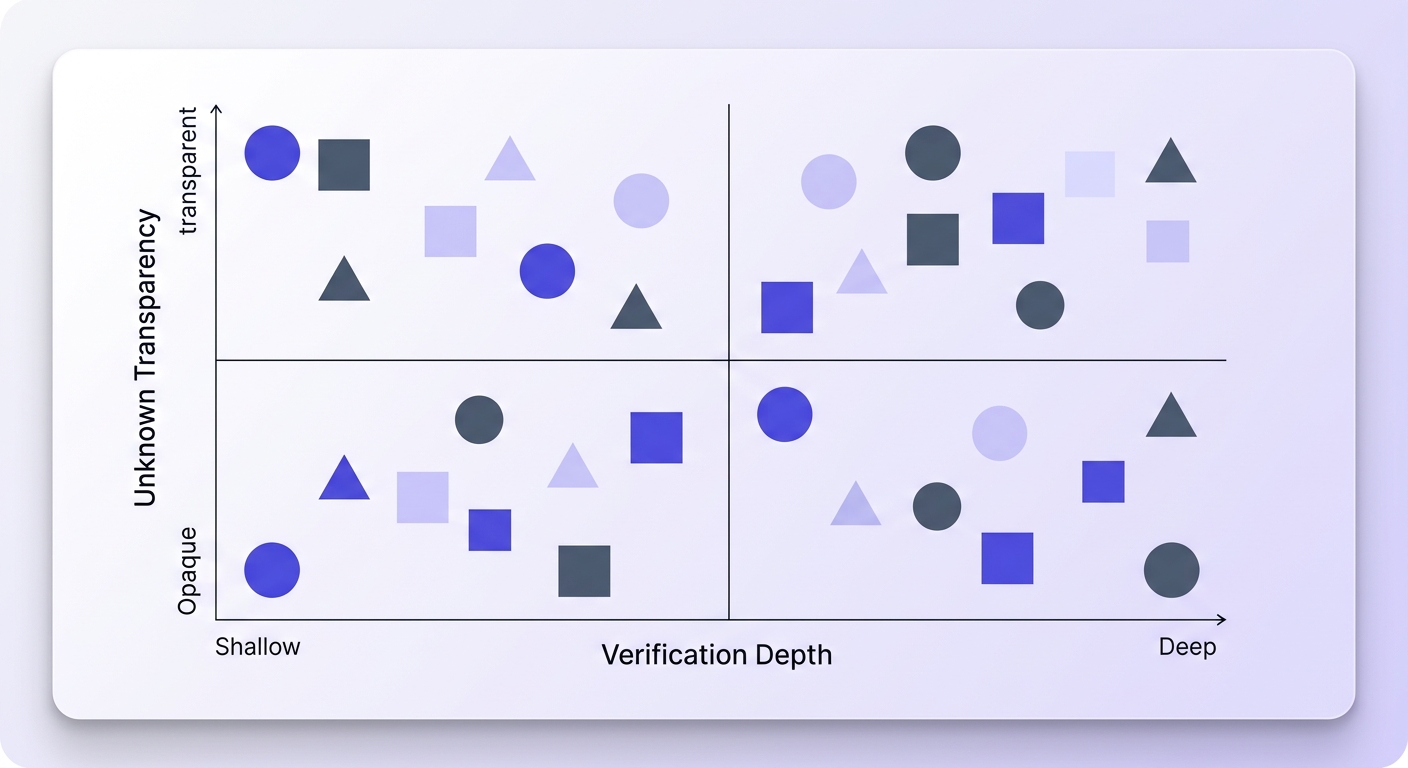
- Verification depth. Does it stop at MX lookup, or does it probe the mailbox directly via SMTP? MX-only tools will mark every address on a valid domain as safe. That's not verification — it's DNS lookup dressed up as verification.
- Status granularity. Three-bucket tools (valid/invalid/unknown) hide information. Ten statuses give you the signal you need to segment correctly.
- Unknown handling. Auto-refund vs. charge-and-move-on. At scale, this is the biggest cost variable. A 15% unknown rate on 500,000 addresses is 75,000 credits — either refunded to you or banked by the verifier.
- ESP integrations. One-click sync vs. download-and-reupload. The time cost difference at 50K+ contacts is not trivial, especially when you're verifying before every major send.
- Bulk throughput. Async queue-and-poll for large files, synchronous for real-time API use cases. A verifier that tries to handle both synchronously will be slow at bulk and overkill for single lookups.
- Pricing transparency. Per-credit vs. subscription, and whether unknowns eat into your budget. Read the pricing page carefully — the credit cost per unknown is often buried.
How to run a bulk verification the right way
Don't upload your full list first. Start with a sample of 500–1,000 addresses. Read the status mix before you commit the whole file — it tells you what kind of problem you're dealing with.
A list with 15%+ catch-all and 4% invalid is a cold-outreach list that's been sitting too long. A list with 8% invalid and 2% spamtrap is a purchased list that should probably be discarded rather than cleaned. Those are different problems requiring different responses, and you can see which one you have from the sample breakdown alone.
- Upload a 500–1,000 address sample. Read the status distribution before touching the full file.
- On the full run, segment on export: safe addresses to your primary send audience, risky and catch-all to a suppressed or re-engagement segment.
- Suppress disposable and role addresses at the point of capture — a email verifier at your signup form catches them before they enter the list at all.
- Flag and permanently remove spamtrap, disabled, and invalid addresses. Do not move them to a suppression segment — delete them.
- Re-verify any list older than 90 days before sending. Email addresses decay at 2–3% per month; a list you verified in Q1 is a different list by Q3.
- Document the verification run date and status breakdown. When you're troubleshooting a deliverability drop six months from now, this record is the first thing you'll want.
The 90-day rule
A list verified more than 90 days ago should be treated as unverified. Job changes, account closures, and domain migrations happen continuously. The 2–3% monthly decay rate means a 6-month-old verification has a meaningful error rate — enough to push your bounce rate above the 2% penalty threshold on a large send.
Integrating a bulk verifier into your ESP workflow
The CSV export-import workflow works. It's also slow, error-prone, and easy to skip when you're under deadline pressure. The time cost at 50K+ contacts — export, verify, download, reformat, reupload, re-tag — is 45–90 minutes of manual work per campaign. That's the real cost of not having a native integration.
VEC connects directly to 17 ESPs: Mailchimp, Klaviyo, HubSpot, SendGrid, ActiveCampaign, ConvertKit, Drip, Mailgun, MailerLite, GetResponse, Campaign Monitor, AWeber, Constant Contact, Sendinblue (Brevo), Elastic Email, Mailjet, and Moosend. One-click sync pulls the audience in, runs verification, and writes the status back — your list goes in dirty, comes out tagged.
For real-time use cases — verifying at the point of signup, not after the fact — the API is the right tool. A single POST /functions/v1/api-verify-single call returns a result in under a second. You can block the form submission on invalid, disposable, or role statuses and let safe and risky through with appropriate handling. This is the cleanest way to prevent bad addresses from entering the list in the first place.
// POST /functions/v1/api-verify-single
// Authorization: Bearer <your-api-key>
{
  "email": "user@example.com"
}

// Response
{
  "email": "user@example.com",
  "status": "safe",
  "sub_status": null,
  "free_email": false,
  "role": false,
  "disposable": false
}
For bulk, the API accepts up to 50,000 addresses per task chunk via POST /functions/v1/api-verify-bulk, processes asynchronously, and returns results via GET /functions/v1/api-get-results. Lists larger than 50K split into chunks automatically — you poll for completion on each chunk and merge the results.
Keep your suppression list in sync with your verifier's invalid and spamtrap outputs. The suppression list is only useful if it's current — an address that was safe 18 months ago and is now a recycled spamtrap will not be on your suppression list unless you've re-verified and updated it.
How often should you verify your list?
The 2–3% monthly decay rate is the number to anchor on. A 100,000-address list loses 2,000–3,000 valid addresses every 30 days — not because people are unsubscribing, but because email addresses die. Job changes, domain shutdowns, provider migrations, account closures.
The right verification frequency depends on how you're sending:
- Before every major campaign — non-negotiable for cold outreach, where the list is more likely to be stale.
- After any 90-day send gap — if you haven't mailed a segment in three months, verify before reactivating it.
- After any list purchase or import — purchased lists should be verified before the first send, full stop. No exceptions.
- Continuously at signup via API — for high-volume transactional senders, catching bad addresses at entry is cheaper than cleaning them later.
- When your metrics start slipping — open rates dropping, bounce rate climbing, spam complaint rate above 0.1% are all signals that your list has aged past its last verification.
The cost math is straightforward. Verifying 100,000 addresses costs a fixed number of credits. Sending to 3,000 invalid addresses at a typical ESP — triggering bounce penalties, reputation degradation, and potential IP blacklisting — costs you far more in suppressed deliverability on every subsequent send. The verification run is the cheap option.
Before you run the full list, verify the domain's mail server for any domain that looks unfamiliar. A domain with no MX record will fail at the DNS stage for every address on it — knowing that upfront saves you credits on a block of addresses that were never going to verify clean.
Frequently asked questions
What is a bulk email verifier and how does it work?
What's the difference between valid, catch-all, and unknown email statuses?
How do I know if my email list needs cleaning?
Why do some email addresses come back as unknown even when they exist?
How often should I verify my email list?
What happens to my sender reputation if I send to unverified addresses?
Do bulk email verifiers charge for unknown results?
How do I connect a bulk email verifier to Mailchimp, HubSpot, or Klaviyo?
Bounce rate is the metric that warns you the list has gone bad. Verification is what keeps it from getting there. Run a sample through the verifier, read the status mix, and you'll know within minutes whether you're dealing with normal decay or a list that needs serious intervention before the next send.
Try Valid Email Checker free
Verify any email in under a second
Get 200 free verifications. No credit card. Auto-refund on every Unknown result — the only verifier we know that does this.
- 200 free credits when you sign up
- Auto-refund every Unknown verification (we're the only ones that do)
- 11-stage flow catches what 1-step checkers miss
- Drop-in integrations for Mailchimp, HubSpot, SendGrid, 14 more

Written by
EmmanuelFounder of Valid Email Checker. Spent eight years inside email infrastructure before deciding the world needed a verifier that actually refunds Unknown results. Writes about deliverability, DNS, and the parts of email nobody else wants to explain. PLACEHOLDER BIO — replace via /admin/blog/authors.