
Downgrading your subscription: scheduled for next renewal
Downgrading to a smaller plan is the right move when you consistently use less than your current allocation. Unlike upgrades (which are immediate), downgrades are scheduled for your next renewal date — you keep the current plan until then.
How downgrades work
- Scheduled for next renewal, not immediate.
- No charge when you schedule — the new lower price is billed at the renewal.
- Keep your current plan with full access until the renewal date.
- Cancel anytime before the renewal if you change your mind.
Why downgrades are scheduled
You already paid for the current cycle's allocation. Cutting you down immediately would mean losing credits you have a right to use. Scheduling the change at renewal means you get the full month of the larger plan you paid for, then switch to the smaller plan when the next cycle starts.
How to downgrade
- Open Buy Credits from the sidebar.
- Select the Monthly Plans tab.
- Pick a plan smaller than your current one. The card shows "Downgrade: Changes on next billing cycle".
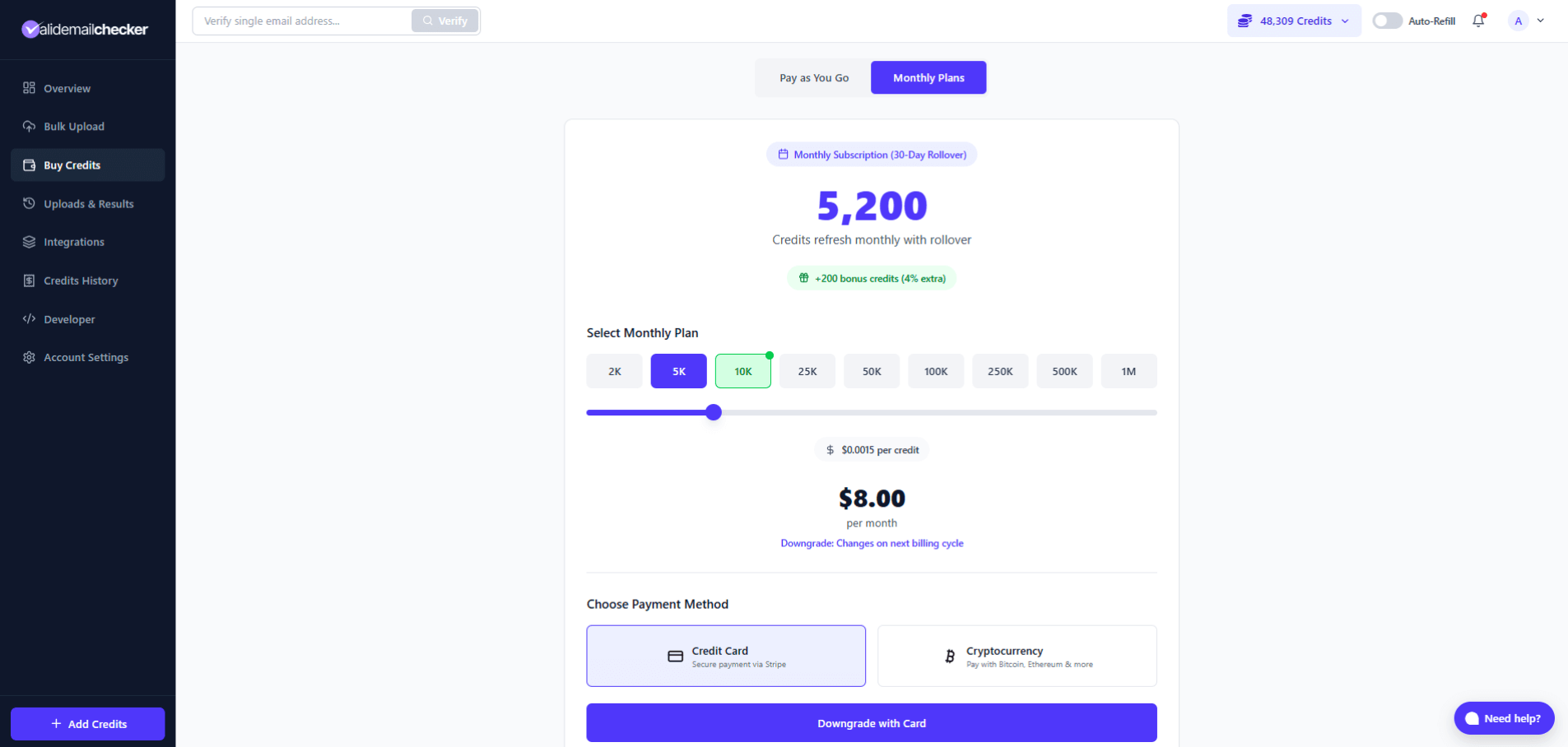
- Pick the payment method that the future renewal should use.
- Click Downgrade with Card (or the crypto equivalent). The Downgrade Preview modal opens.
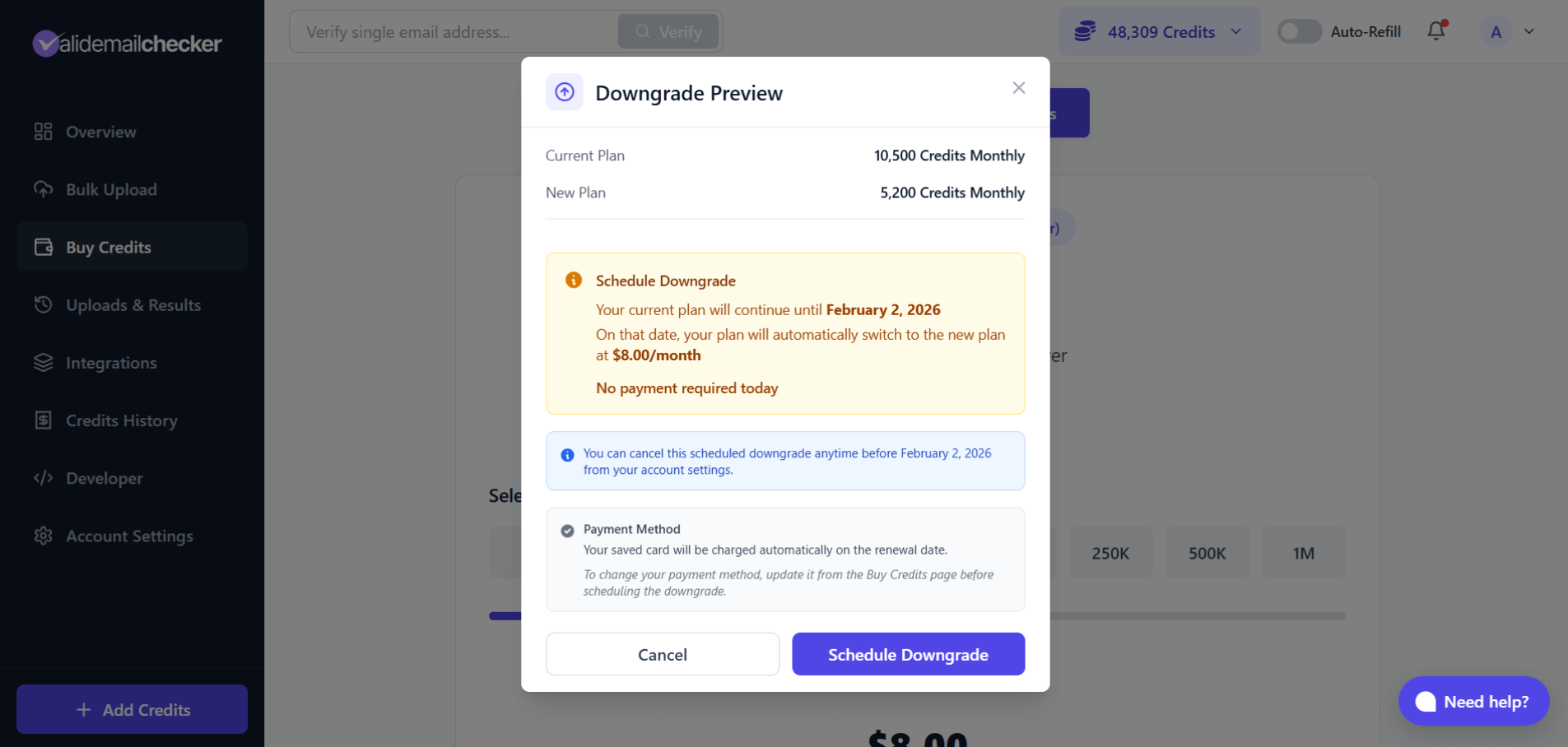
The preview lays out:
- Current plan vs new plan.
- The date the downgrade takes effect (your next billing date).
- New monthly price.
- A note that no payment is required today.
- A reminder that the scheduled downgrade can be cancelled anytime before it kicks in.
- Click Schedule Downgrade.
After scheduling
Your subscription page shows a yellow banner confirming the scheduled change.
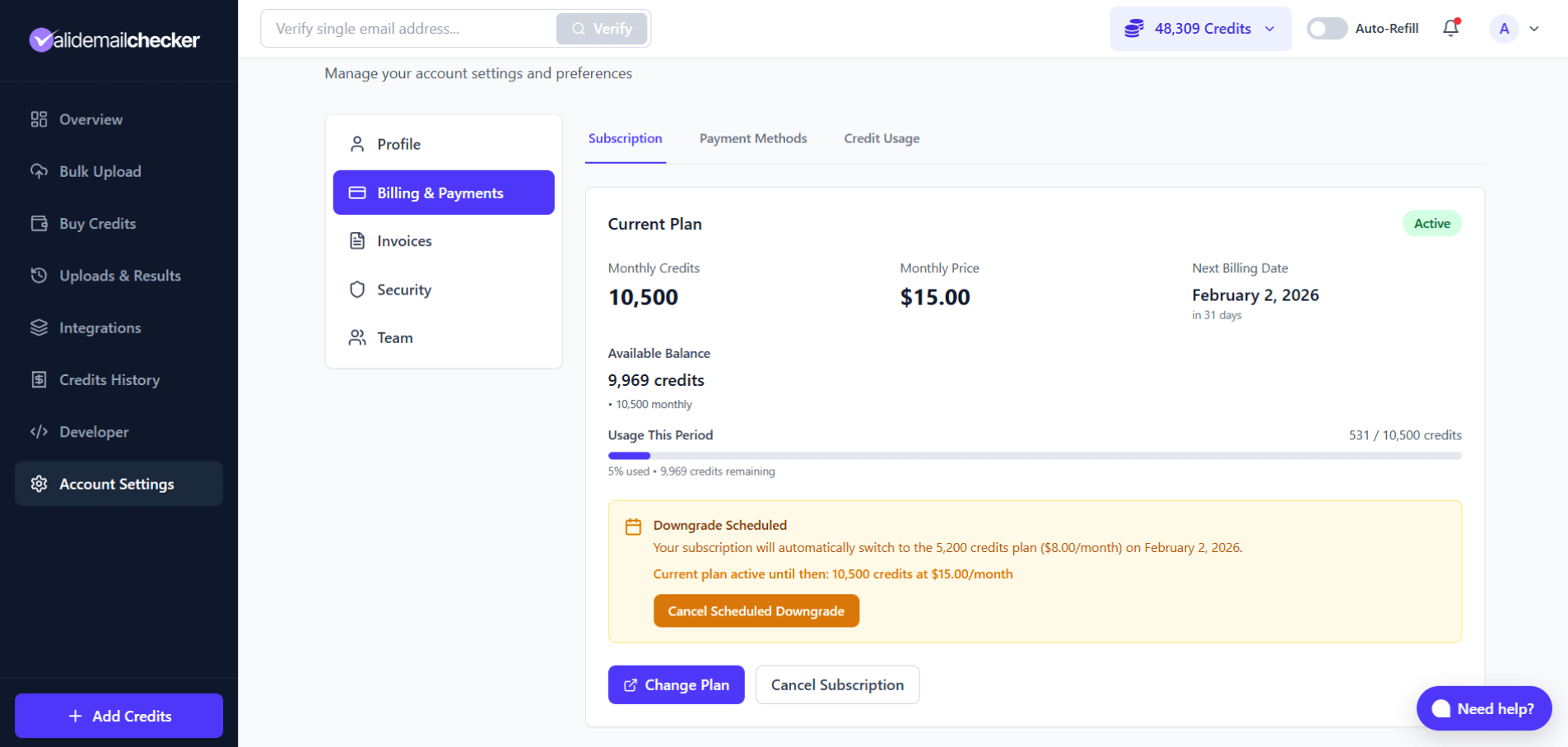
The banner shows:
- The new plan you are switching to.
- When the switch happens (your renewal date).
- A confirmation that your current plan is still fully active until then.
- A Cancel Scheduled Downgrade button.
What happens to your credits
Until the renewal date
Your current monthly credits remain available. No change. Use them as normal.
At the renewal
- Monthly bucket resets to the new (smaller) plan amount.
- Card is charged the new (smaller) price.
- A new 30-day billing cycle starts.
Monthly credits don't carry across renewals in either direction — there's no rollover, no cap, no rollover math. PAYG credits are entirely separate and unaffected.
Cancelling a scheduled downgrade
Change your mind before the renewal? Cancel the schedule:
- Go to Account Settings → Billing & Payments.
- Find the yellow Downgrade Scheduled banner.
- Click Cancel Scheduled Downgrade.
Your subscription continues on the current plan as if nothing happened.
What happens on renewal day
| Step | What happens |
|---|---|
| 1 | Renewal job runs at your billing time |
| 2 | New (lower) plan activates |
| 3 | Card is charged the new, lower price |
| 4 | Monthly bucket reset to the new plan amount |
| 5 | 30-day cycle begins |
Downgrade vs. cancel
| Downgrade | Cancel |
|---|---|
| Keep a subscription at lower cost | End the subscription entirely |
| Continue receiving Monthly credits | No more Monthly credits after period end |
| Predictable, lower monthly charge | No more charges |
| Automatic renewals continue | No more renewals |
Pick downgrade if you still need credits regularly but fewer of them. Pick cancel if you do not need credits on a recurring basis at all.
Tips
Check usage first
Open Credit Usage to see your actual monthly consumption. Pick a smaller plan that covers your real usage with a small buffer — going too small means you blow through it fast and need to upgrade right back.
Time it right
Schedule the downgrade early in your billing cycle to get maximum time on the larger allocation you have already paid for.
Use what you have first
Monthly credits don't carry over, so any unused balance at renewal disappears. Run through what you can before the downgrade takes effect rather than letting it lapse.
Common questions
When does the downgrade take effect?
On your next billing date. The exact date is shown in the Downgrade Preview modal and in the yellow banner on the subscription page.
Do I pay anything when I schedule a downgrade?
No. There is no charge when scheduling. You are charged the new, lower price on the renewal day.
Can I still use all my credits until then?
Yes. Current plan remains fully active until the downgrade takes effect. Use credits as normal.
What if I upgrade after scheduling a downgrade?
The scheduled downgrade is automatically cancelled. The upgrade takes effect immediately and supersedes the schedule.
Can I downgrade multiple tiers at once?
Yes. Go from any plan to any smaller plan in one step — for example, from the 100k-credit tier directly to the 5k-credit tier.
What about PAYG credits?
Unaffected. PAYG is fully separate from the subscription.
Can I cancel the downgrade after scheduling?
Yes, anytime before the renewal date. The banner on the subscription page has a one-click cancel.
Quick reference
| Aspect | What happens |
|---|---|
| When it takes effect | Next renewal date |
| Payment when scheduling | None |
| Current Monthly credits | Keep until renewal |
| Current plan access | Active until renewal |
| PAYG credits | Unaffected |
| Can cancel the schedule? | Yes, anytime before renewal |
| Upgrading instead? | Cancels the scheduled downgrade |
Next steps
Related questions
Still stuck? Email support